
Security & onboarding
You decide who sees what
Role-based menus, a superadmin in control, and a clear path from set-up to go-live, with training and support all the way.
Security & control
Access that matches each person’s job
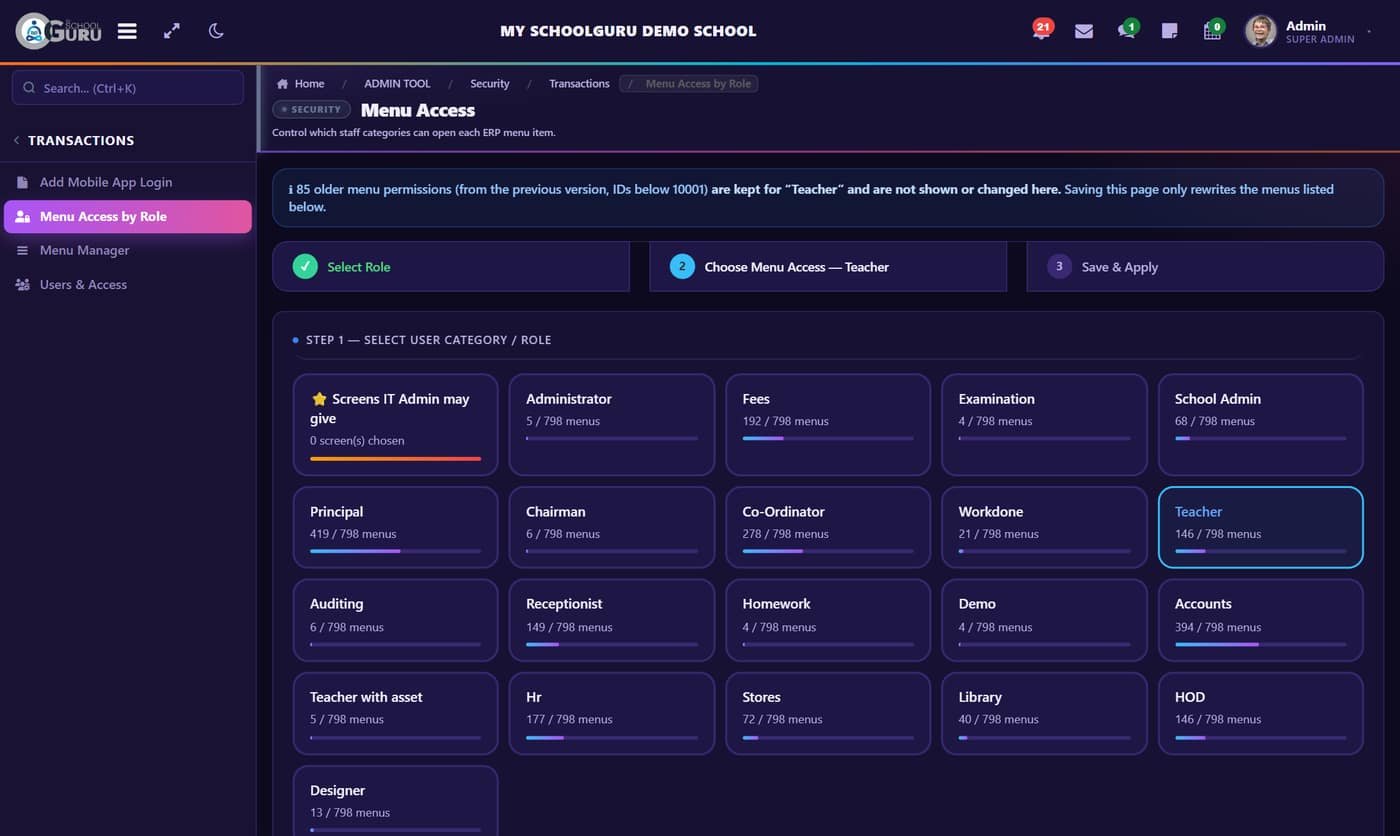
- Role-based menusEach role sees only the screens you tick
- Superadmin in controlOnly the superadmin creates roles and admins
- IT Admin with limitsManages staff logins only within your list
- Sign-in historyEvery login and failed attempt recorded
School code + 6-digit PIN
Staff sign in with their school code, Staff ID and a personal PIN on the mobile apps.
PIN set with OTP
First login is verified by OTP, and then each person sets their own PIN.
One database, kept whole
Every record stays when staff change. Nothing lives in personal files or phones.
Benefits
What changes for each person
One system. Every role. Less paperwork, more time for teaching.
👑 Owner
- Live picture of the school
- Fee position any time
- Evening digest mail
🎓 Principal
- Attendance & results in one place
- Pending work flagged
- Fewer paper files
👩🏫 Teachers
- Marks & homework on the phone
- Less register work
- Own dashboard
🗂️ Office
- Receipts & certificates in seconds
- One-click reports
- No double entry
👨👩👧 Parents
- Instant attendance alerts
- Pay fees online
- Homework & circulars
Getting started
From set-up to go-live
Set-up
School details, classes, fee heads and roles
Data
Students, staff and opening balances loaded
Training
Hands-on sessions for office, teachers and admins
Go live
Apps for parents and staff, machines connected
Support
Help desk, updates and new features
Questions
Frequently asked
Can we connect our biometric and RFID machines?
Yes. Staff biometric punches and student RFID cards are stored live in the school database. In/out alerts go to staff and parents, and the late, absent and monthly registers update automatically.
Does it work with Tally?
Yes. Accounts & Tally covers vouchers and ledgers, with export to Tally.
Can parents pay fees online?
Yes. Parents pay from the app and receipts post automatically. Dues reminders go to parents term-wise.
Who controls which screens each person can see?
Your superadmin. Only the superadmin creates roles and admins, each role sees only the screens you tick, and the IT admin can manage staff logins only within your list.
Is training included?
Onboarding includes hands-on sessions for office staff, teachers and admins, followed by help-desk support, updates and new features.
Can we export reports?
Every one of the 340+ reports exports to Excel and a branded PDF, with filters by year, class, section and date.
See My Schoolguru running in your school
Book a walkthrough of the ERP and the Parent, Teacher and Management apps with your own classes, fee heads and roles.